
ChatGPT Box
将ChatGPT深度集成到浏览器中, 你所需要的一切均在于此
[![license][license-image]][license-url]
[![release][release-image]][release-url]
[![verfiy][verify-image]][verify-url]
[English](README.md) | 简体中文
### 安装链接
[![Chrome][Chrome-image]][Chrome-url]
[![Edge][Edge-image]][Edge-url]
[![Firefox][Firefox-image]][Firefox-url]
[![Safari][Safari-image]][Safari-url]
[![Android][Android-image]][Android-url]
[![Github][Github-image]][Github-url]
(目前正在等待商店审核, [Chrome][Chrome-url]及[Firefox][Firefox-url]版本已过审)
[使用指南](https://github.com/josStorer/chatGPTBox/wiki/Guide) |
[效果预览](#Preview) |
[开发&贡献][dev-url] |
[捐助](https://www.buymeacoffee.com/josStorer) |
[鸣谢](#Credit)
[视频演示](https://www.bilibili.com/video/BV1524y1x7io)
[dev-url]: https://github.com/josStorer/chatGPTBox/wiki/Development&Contributing
[license-image]: http://img.shields.io/badge/license-MIT-blue.svg
[license-url]: https://github.com/josStorer/chatGPTBox/blob/master/LICENSE
[release-image]: https://img.shields.io/github/release/josStorer/chatGPTBox.svg
[release-url]: https://github.com/josStorer/chatGPTBox/releases/latest
[verify-image]: https://github.com/josStorer/chatGPTBox/workflows/verify-configs/badge.svg
[verify-url]: https://github.com/josStorer/chatGPTBox/actions/workflows/verify-configs.yml
[Chrome-image]: https://img.shields.io/badge/-Chrome-brightgreen?logo=google-chrome&logoColor=white
[Chrome-url]: https://chrome.google.com/webstore/detail/chatgptbox/eobbhoofkanlmddnplfhnmkfbnlhpbbo
[Edge-image]: https://img.shields.io/badge/-Edge-blue?logo=microsoft-edge&logoColor=white
[Edge-url]: https://github.com/josStorer/chatGPTBox/wiki/Install
[Firefox-image]: https://img.shields.io/badge/-Firefox-orange?logo=firefox-browser&logoColor=white
[Firefox-url]: https://addons.mozilla.org/firefox/addon/chatgptbox/
[Safari-image]: https://img.shields.io/badge/-Safari-blue?logo=safari&logoColor=white
[Safari-url]: https://github.com/josStorer/chatGPTBox/wiki/Install
[Android-image]: https://img.shields.io/badge/-Android-brightgreen?logo=android&logoColor=white
[Android-url]: https://github.com/josStorer/chatGPTBox/wiki/Install#install-to-android
[Github-image]: https://img.shields.io/badge/-Github-black?logo=github&logoColor=white
[Github-url]: https://github.com/josStorer/chatGPTBox/releases/latest
## ✨ Features
- 🌈 在任何页面随时呼出聊天对话框
- 🔗 多种API支持 (免费用户和Plus用户可用Web API, 此外还有GPT-3, GPT-3.5等)
- 📦 对各种常用网站的集成适配 (reddit, quora, youtube, github, gitlab, zhihu, bilibili) (受到[wimdenherder](https://github.com/wimdenherder)启发)
- 🔍 对所有主流搜索引擎的适配, 并支持自定义查询以支持额外的站点
- 🧰 框选工具与右键菜单, 执行各种你的需求, 如翻译, 总结, 润色, 情感分析, 段落划分, 代码解释, 问询
- 🗂️ 静态卡片支持浮出聊天框, 进行多分支对话
- 🖨️ 随意保存你的完整对话记录, 或进行局部复制
- 🎨 强大的渲染支持, 不论是代码高亮, 还是复杂数学公式
- 🌍 多语言偏好支持
- 📝 [自定义API地址](https://github.com/Ice-Hazymoon/openai-scf-proxy)支持
- ⚙️ 所有站点适配与工具均可自由开关, 随时停用你不需要的模块
- 💡 工具与站点适配开发易于扩展, 对于开发人员易于自定义, 请查看[开发&贡献][dev-url]部分
- 😉 此外, 如果回答有任何不足, 直接聊天解决!
## Preview
**搜索引擎适配, 浮动窗口, 对话分支**

**常用站点集成, 选择浮动工具**

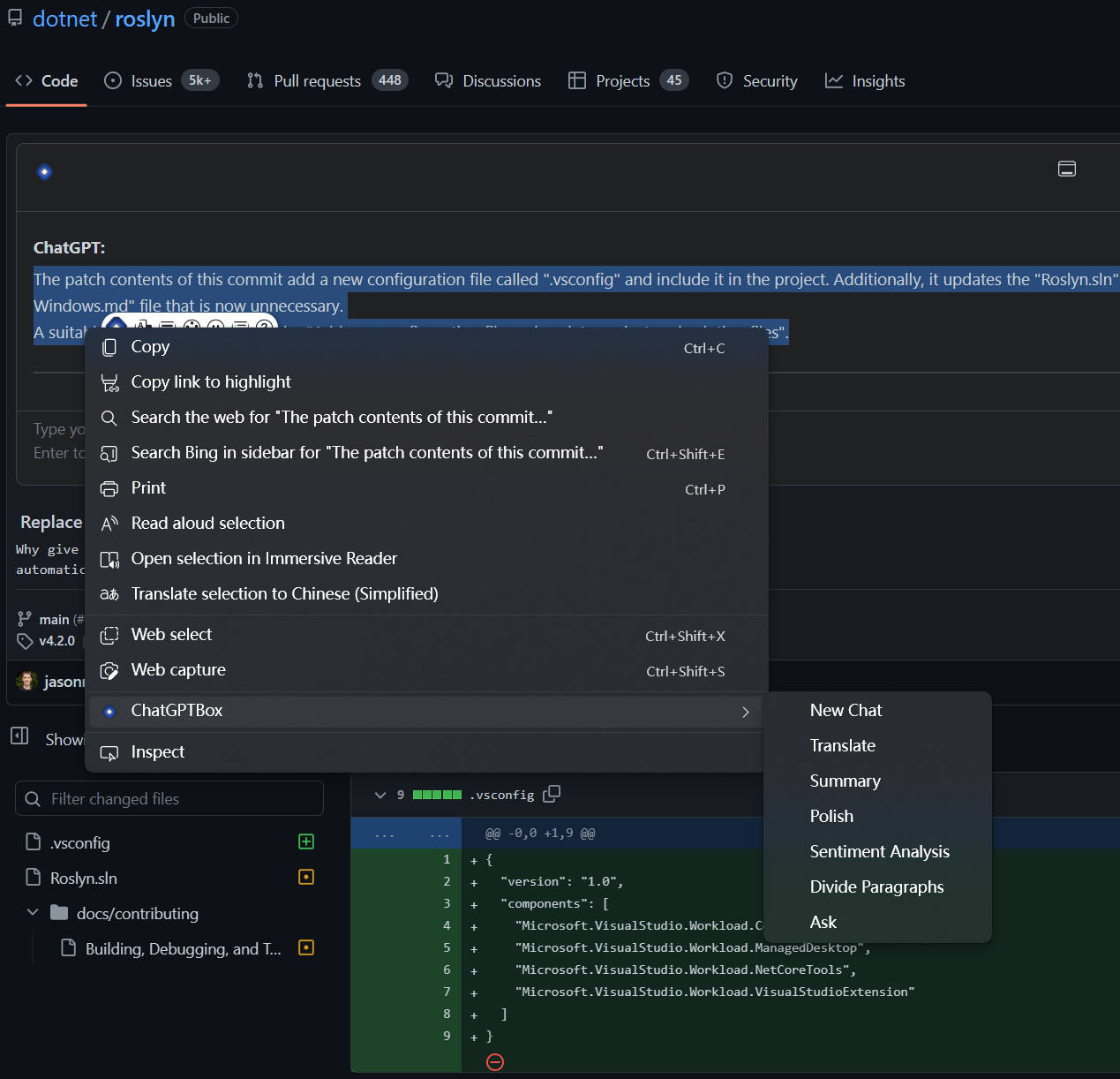
**Git分析, 右键菜单**
**视频总结**

**移动端效果**

**设置界面**

## Credit
该项目基于我的另一个项目 [josStorer/chatGPT-search-engine-extension](https://github.com/josStorer/chatGPT-search-engine-extension)
[josStorer/chatGPT-search-engine-extension](https://github.com/josStorer/chatGPT-search-engine-extension)
fork自 [wong2/chat-gpt-google-extension](https://github.com/wong2/chat-gpt-google-extension)(我从中学到很多)
并在2022年12月14日与上游分离
[wong2/chat-gpt-google-extension](https://github.com/wong2/chat-gpt-google-extension) 的想法源于
[ZohaibAhmed/ChatGPT-Google](https://github.com/ZohaibAhmed/ChatGPT-Google) ([upstream-c54528b](https://github.com/wong2/chatgpt-google-extension/commit/c54528b0e13058ab78bfb433c92603db017d1b6b))
### 额外声明
谨慎展开该声明! 这个声明主要针对可能的道德问题指责, 因为我收到了一些攻击性言论, 因而我在此进行解释
该项目最终可追溯至chatGPT刚刚爆火时出现的一个明星项目 [wong2/chat-gpt-google-extension](https://github.com/wong2/chat-gpt-google-extension),
一开始我为其添加了各种市面上主流搜索引擎的支持, 后续我也进一步改进了兼容性, 并提交了自动化构建支持等.
起初我更倾向于贡献到原始项目, 你可以查看我的[PR记录](https://github.com/wong2/chatgpt-google-extension/pulls?q=is%3Apr+author%3AjosStorer+).
我也在原始项目中的许多Issue中参与解决问题, 例如[该问题](https://github.com/wong2/chatgpt-google-extension/issues/110#issuecomment-1399831569)中,
我提及了我解决Safari构建的方式, 在[该PR中](https://github.com/wong2/chatgpt-google-extension/pull/187), 我尝试解决挂载点的检测问题,
又比如对于一些赤裸裸的[抄袭现象](https://github.com/wong2/chatgpt-google-extension/issues/197#issuecomment-1399824044), 我也深感不满.
但是, 在一些问题上, 我与原作者的理念不合, 例如像[Katex渲染](https://github.com/wong2/chatgpt-google-extension/pull/75)的支持, 原作者在持续要求发起者改进后,
却又以体积问题为由拒绝了, 又比如[交互模式](https://github.com/wong2/chatgpt-google-extension/pull/103)的支持, 原作者同样拒绝了, 但是同时却一直把连续对话的Issue, Pin在顶部,
又一直不提供任何支持, 直至被其他团队收购后, 由其他团队进行了实现,
实际上早期我在贡献多搜索引擎支持时, 我认为这是个优先级比较高的功能, 但我觉得原作者推进有些缓慢, 而在执行一些我觉得优先级不高的事情, 并且其在合并搜索引擎支持后,
又刻意删除了几个引擎的支持, 并发起了一个请求的[讨论](https://github.com/wong2/chatgpt-google-extension/issues/109), 导致用户重新前去提出, 而直至项目被收购, 讨论被关闭的几个月时间里, 原项目接收到大量的请求, 却全部被忽视了,
这意味着这个讨论一开始就是没有意义的, 我对诸如此类的做事风格深感不满.
而原项目中也有一些有创意的想法, 许多都早于现在的一些独立项目, 例如[视频总结](https://github.com/wong2/chatgpt-google-extension/issues/140)请求,
很早就有人提出了, 但原作者同样拒绝了.
出于种种原因, 我决定与上游分离, 并独立维护各种功能更新, 一直以来, 我维护的分支都始终覆盖了原项目所有功能, 并一直提供大量的额外功能支持, 也就是这个项目的[前身](https://github.com/josStorer/chatGPT-search-engine-extension).
但是, 我一直不愿意上架应用商店, 因为我认为这有违道德, 我不希望与原项目构成竞争.
直至2023年2月份, 原作者宣布项目被收购, 代码将闭源, 我最终决定将一些比较好的社区提出的Issue, 但是被原作者拒绝的, 进行整合, 并上架商店, 最终诞生了这个项目.
我仍想特别强调, 我只是对事不对人, 原作者是行业的前辈了, 而我只是个初出茅庐的菜鸡, 我不希望任何人因此对原作者进行任何攻击, 做开源的, 没有谁的时间是免费的,
原作者并没有做错任何事, 并且他的项目启发了大量的社区独立项目, 我也从中学到了很多, 而原作者的成功变现, 及运营过程也是非常值得学习的, 我仍然对其贡献表示尊敬.