Jupyter notebook extensions
===========================
[](https://gitter.im/ipython-contrib/jupyter_contrib_nbextensions?utm_source=badge&utm_medium=badge&utm_campaign=pr-badge&utm_content=badge) [](https://github.com/ipython-contrib/jupyter_contrib_nbextensions/issues)
[](https://travis-ci.org/ipython-contrib/jupyter_contrib_nbextensions) [](https://ci.appveyor.com/project/jcb91/ipython-notebook-extensions-ynb9f) [](https://coveralls.io/github/ipython-contrib/jupyter_contrib_nbextensions) [](https://codecov.io/gh/ipython-contrib/jupyter_contrib_nbextensions)
[](https://github.com/ipython-contrib/jupyter_contrib_nbextensions) [](https://github.com/ipython-contrib/jupyter_contrib_nbextensions) [](https://pypi.python.org/pypi/jupyter_contrib_nbextensions) [](https://pypi.python.org/pypi/jupyter_contrib_nbextensions)
[](http://jupyter-contrib-nbextensions.readthedocs.io/en/latest/)
This repository contains a collection of extensions that add functionality to the Jupyter notebook.
These extensions are mostly written in Javascript and will be loaded locally in
your browser.
The IPython-contrib repository is maintained independently by a group of users and developers and not officially related
to the IPython development team.
The maturity of the provided extensions varies, so please
[create an issue](https://github.com/ipython-contrib/jupyter_contrib_nbextensions/issues/new)
at the project's
[github repository](https://github.com/ipython-contrib/jupyter_contrib_nbextensions)
if you encounter any problems.
IPython/Jupyter version support
===============================
| Version | Description |
|-------------|------------------------------------------------------------------------------------------------|
| IPython 2.x | checkout [2.x branch](https://github.com/ipython-contrib/jupyter_contrib_nbextensions/tree/2.x) |
| IPython 3.x | checkout [3.x branch](https://github.com/ipython-contrib/jupyter_contrib_nbextensions/tree/3.x) |
| Jupyter 4.x | checkout [master branch](https://github.com/ipython-contrib/jupyter_contrib_nbextensions/) |
There are different branches of the notebook extensions in this repository.
Please make sure you use the branch corresponding to your IPython/Jupyter version.
Documentation
=============
Documentation for all maintained extensions can be found at
[Contributed Jupyter Noteboox Extensions on ReadTheDocs](http://jupyter-contrib-nbextensions.readthedocs.io/en/latest)
In the 4.x Jupyter repository, all extensions that are maintained and active
have at least a yaml file to allow them being configured using the
[`jupyter_nbextensions_configurator`](https://github.com/Jupyter-contrib/jupyter_nbextensions_configurator)
server extension, which is installed as a dependency of this package.
Most also have a markdown readme file for documentation.
The `jupyter_nbextensions_configurator` server extension shows an nbextensions
tab on the main notebook dashboard (file tree page) from which you can see each
nbextension's markdown readme, and configure its options.
To view documentation without installing, you can browse the nbextensions
directory to read markdown readmes on github at
https://github.com/ipython-contrib/jupyter_contrib_nbextensions/tree/master/src/jupyter_contrib_nbextensions/nbextensions.
For older releases (2.x and 3.x), look at the [Wiki](https://github.com/ipython-contrib/jupyter_contrib_nbextensions/wiki)
Some extensions are not documented. We encourage you to add documentation for them.
Installation
============
To install notebook extensions, three steps are required. First, this Python package needs to be installed.
Then, the notebook extensions themselves can be copied to the Jupyter data directory.
Finally, the installed notebook extensions can be enabled, either by using built-in Jupyter commands,
or more convenient by using the jupyter_nbextensions_configurator server extension.
The Python package installation step is necessary to allow painless installation of the extensions togther with
additional items like nbconvert templates, pre-/postprocessors, and exporters.
1. Install the python package
-----------------------------
### PIP
All of the nbextensions in this repo are provided as parts of a python package,
which is installable in the usual manner, using `pip` or the `setup.py` script.
You can install directly from the current master branch of the repository
pip install https://github.com/ipython-contrib/jupyter_contrib_nbextensions/tarball/master
All the usual pip options apply, e.g. using pip's `--upgrade` flag to force an
upgrade, or `-e` for an editable install.
### Conda
There are conda packages for the notebook extensions and the notebook extensions configurator
available from [conda-forge](https://conda-forge.github.io). You can install both using
conda install -c conda-forge jupyter_contrib_nbextensions
This also automatically installs the Javascript and CSS files
(using `jupyter contrib nbextension install --sys-prefix`), so the second installation step
below can therefore be skipped.
### Installation from cloned Repo
You can also install from a cloned repo, which can be useful for development.
You can clone the repo using
git clone https://github.com/ipython-contrib/jupyter_contrib_nbextensions.git jupyter_contrib_nbextensions
Then perform an editable pip install using
pip install -e jupyter_contrib_nbextensions
2. Install javascript and css files
-----------------------------------
This step copies the nbextensions javascript and css files into the jupyter
server's search directory. A `jupyter` subcommand is provided which installs
all of the nbextensions files:
jupyter contrib nbextension install --user
The command is essentially a wrapper around the notebook-provided
`jupyter nbextension`, and can take most of the same options, such as `--user`
to install into the user's home jupyter directories, `--system` to perform
installation into system-wide jupyter directories, `sys-prefix` to install into
python's `sys.prefix`, useful for instance in virtual environments, and
`--symlink` to symlink the nbextensions rather than copying each file
(recommended).
An analogous `uninstall` command is also provided, to remove all of the
nbextension files from the jupyter directories.
3. Enabling/Disabling extensions
--------------------------------
To use an nbextension, you’ll also need to enable it, which tells the notebook
interface to load it. To do this, you can use a Jupyter subcommand:
jupyter nbextension enable
for example,
jupyter nbextension enable codefolding/main
To disable the extension again, use
jupyter nbextension disable
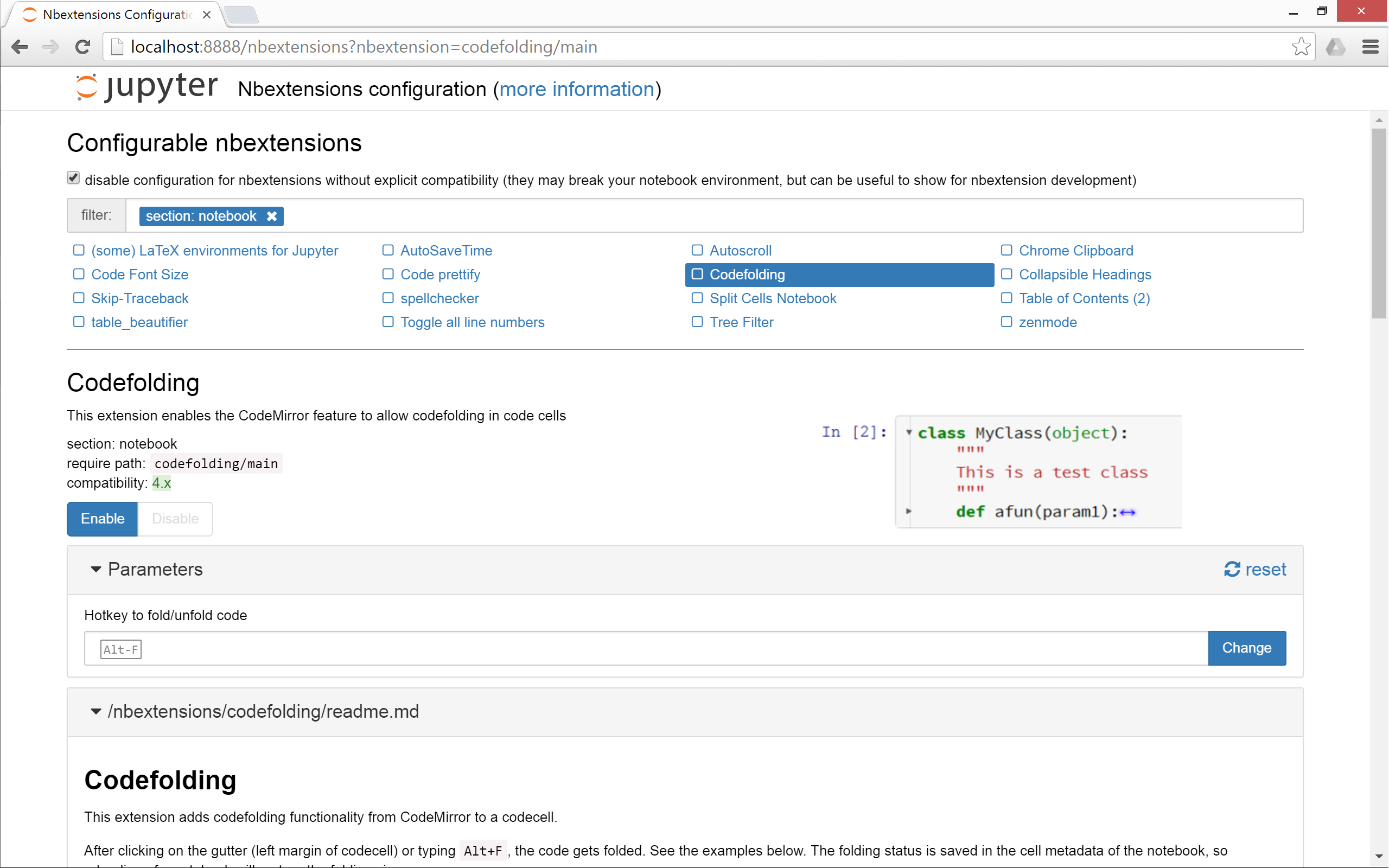
**Alternatively**, and more conveniently, you can use the
[`jupyter_nbextensions_configurator`](https://github.com/Jupyter-contrib/jupyter_nbextensions_configurator)
server extension, which is installed as a dependency of this repo, and can be
used to enable and disable the individual nbextensions, as well as configure
their options. You just have to open a tab at `http://localhost:8888/nbextensions/` (you may have to adjust the port) and you will have access to a dashboard where extensions can be enabled/disabled via checkboxes. Additionally a short documentation for each extension is displayed and configuration options are presented.
4. Migrating from older versions of this repo
---------------------------------------------
The `jupyter contrib nbextensions` command also offers a `migrate` subcommand,
which will
* uninstall the old repository version's files, config and python package
* adapt all `require` paths which have changed. E.g. if you had the
collapsible headings nbextension enabled with its old require path of
`usability/collapsible_headings/main`, the `migrate` command will alter
this to match the new require path of `collapsible_headings/main`.
For complex or customized installation scenarios, please look at the
documentation for installing notebook extensions, server extensions, nbconvert
pre/postprocessors and templates on the Jupyter homepage http://www.jupyter.org.
More information can also be found in the
[Wiki](https://github.com/ipython-contrib/jupyter_contrib_nbextensions/wiki).
Notebook extension structure
============================
The nbextensions are stored each as a separate subdirectory of `src/jupyter_contrib_nbextensions/nbextensions`
Each notebook extension typically has it's own directory containing:
* `thisextension/main.js` - javascript implementing the extension
* `thisextension/main.css` - optional CSS
* `thisextension/readme.md` - readme file describing the extension in markdown format
* `thisextension/config.yaml` - file describing the extension to the `jupyter_nbextensions_configurator` server extension
Changes
=======
0.2.1
-----
* New features:
- New `html_embed` nbconvert exporter
- Added `select_keymap` nbextension
* Docs improvements:
- get docs readable at http://jupyter-contrib-nbextensions.readthedocs.io/
- add an auto-enabled nbextension `contrib_nbextensions_help_item`, which
adds a help menu item to point at RTD
- Add missing readmes/yaml links to readmes
* bugfixes/improvements:
- added tests for `toc2` and `html_embed` exporters
- tooltips on `higlighter`
- `toc2` issue with zero-length navigation menu
- switch `table_beautifier` from bootstrap-table to tablesorter plugin
- `code_prettify`: corrected insufficient re replacement
- `dragdrop` fix url generation when using non-default base_url
0.2.0
-----
* __alter app default settings__
* Make `--user` flag in install app default to `False`
* __New__ `code_prettify` extension
* __add plural nbextensions command alias__ i.e. `jupyter contrib nbextensions` as an alias of `jupyter contrib nbextension`
* docs:
* Add docs generation
* Add lots of missing readme & yaml files
* Attempt to get docs builds working on readthedocs
* Bugfixes: `limit_output`, postprocessors, nbconvert support
* Remove stale `breakpoints` extension
* various CI & packaging fixes/improvements, including adding conda-forge installation
* `latex_envs`:
* update for MathJax use and html export
* add latex_envs.py - exporter library
* add templates for conversion
* configure entry points for exporters in `setup.py`
* update readme
* `toc2`:
* modifications to templates
* configure entry points for exporters in `setup.py`
* update README
0.1.0
-----
* first release with pep-440 compatible versioning