mirror of
https://github.com/wassname/jupyter_contrib_nbextensions.git
synced 2026-08-15 12:35:51 +08:00

122 lines
4.9 KiB
Markdown
122 lines
4.9 KiB
Markdown
Installing Jupyter Notebook Extensions
|
|
======================================
|
|
|
|
To install the `jupyter_contrib_nbextensions` notebook extensions, three steps
|
|
are required. First, the Python pip package needs to be installed. Then, the
|
|
notebook extensions themselves need to be copied to the Jupyter data directory.
|
|
Finally, the installed notebook extensions can be enabled, either by using
|
|
built-in Jupyter commands, or more conveniently by using the
|
|
[jupyter_nbextensions_configurator](https://github.com/Jupyter-contrib/jupyter_nbextensions_configurator)
|
|
server extension, which is installed as a dependency of this repo.
|
|
|
|
The Python package installation step is necessary to allow painless
|
|
installation of the nbextensions together with additional items like nbconvert
|
|
templates, pre-/postprocessors, and exporters.
|
|
|
|
|
|
1\. Install the python package
|
|
------------------------------
|
|
|
|
|
|
### PIP
|
|
|
|
All of the nbextensions in this repo are provided as parts of a python package,
|
|
which is installable in the usual manner, using `pip` or the `setup.py` script.
|
|
You can install directly from the current master branch of the repository
|
|
|
|
pip install https://github.com/ipython-contrib/jupyter_contrib_nbextensions/tarball/master
|
|
|
|
All the usual pip options apply, e.g. using pip's `--upgrade` flag to force an
|
|
upgrade, or `-e` for an editable install.
|
|
|
|
|
|
### Conda
|
|
|
|
There are conda packages for the notebook extensions and the notebook extensions configurator
|
|
available from [conda-forge](https://conda-forge.github.io). You can install both using
|
|
|
|
conda install -c conda-forge jupyter_contrib_nbextensions
|
|
|
|
This also automatically installs the Javascript and CSS files
|
|
(using `jupyter contrib nbextension install --sys-prefix`), so the second installation step
|
|
below can therefore be skipped.
|
|
|
|
|
|
### Installation from cloned Repo
|
|
|
|
You can also install from a cloned repo, which can be useful for development.
|
|
You can clone the repo using
|
|
|
|
git clone https://github.com/ipython-contrib/jupyter_contrib_nbextensions.git
|
|
|
|
Then perform an editable pip install using
|
|
|
|
pip install -e jupyter_contrib_nbextensions
|
|
|
|
|
|
2\. Install javascript and css files
|
|
------------------------------------
|
|
|
|
This step copies the nbextensions javascript and css files into the jupyter
|
|
server's search directory. A `jupyter` subcommand is provided which installs
|
|
all of the nbextensions files:
|
|
|
|
jupyter contrib nbextension install --user
|
|
|
|
The command is essentially a wrapper around the notebook-provided
|
|
`jupyter nbextension`, and can take most of the same options, such as `--user`
|
|
to install into the user's home jupyter directories, `--system` to perform
|
|
installation into system-wide jupyter directories, `--sys-prefix` to install
|
|
into python's `sys.prefix`, useful for instance in virtual environments, and
|
|
`--symlink` to symlink the nbextensions rather than copying each file
|
|
(recommended).
|
|
|
|
An analogous `uninstall` command is also provided, to remove all of the
|
|
nbextension files from the jupyter directories.
|
|
|
|
|
|
3\. Enabling/Disabling extensions
|
|
---------------------------------
|
|
|
|
To use an nbextension, you'll also need to enable it, which tells the notebook
|
|
interface to load it. To do this, you can use a Jupyter subcommand:
|
|
|
|
jupyter nbextension enable <nbextension require path>
|
|
|
|
for example,
|
|
|
|
jupyter nbextension enable codefolding/main
|
|
|
|
To disable the extension again, use
|
|
|
|
jupyter nbextension disable <nbextension require path>
|
|
|
|
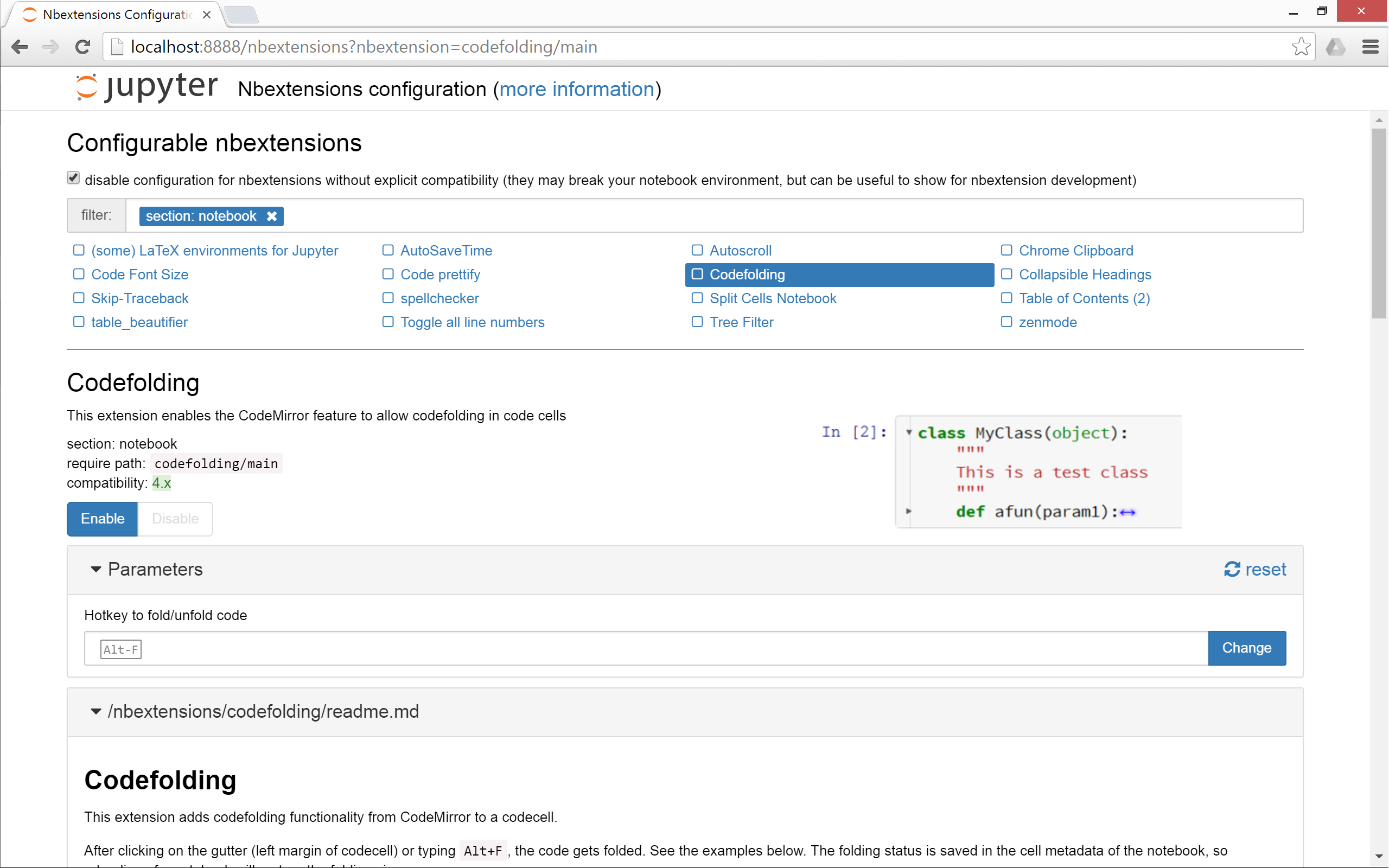
Alternatively, and more conveniently, you can use the
|
|
[jupyter_nbextensions_configurator](https://github.com/Jupyter-contrib/jupyter_nbextensions_configurator)
|
|
server extension, which is installed as a dependency of this repo, and can be
|
|
used to enable and disable the individual nbextensions, as well as configure
|
|
their options.
|
|
|
|
|
|
|
|
|
|
4\. Migrating from older versions of this repo
|
|
----------------------------------------------
|
|
|
|
The `jupyter contrib nbextensions` command also offers a `migrate` subcommand,
|
|
which will
|
|
|
|
* uninstall the old repository version's files, config and python package
|
|
* adapt all `require` paths which have changed. E.g. if you had the
|
|
collapsible headings nbextension enabled with its old require path of
|
|
`usability/collapsible_headings/main`, the `migrate` command will alter
|
|
this to match the new require path of `collapsible_headings/main`.
|
|
|
|
For complex or customized installation scenarios, please look at the
|
|
documentation for installing notebook extensions, server extensions, nbconvert
|
|
pre/postprocessors and templates on the Jupyter homepage http://www.jupyter.org.
|
|
More information can also be found in the
|
|
[Wiki](https://github.com/ipython-contrib/jupyter_contrib_nbextensions/wiki).
|
|
|
|
See also [installing Jupyter](http://jupyter.readthedocs.io/en/latest/install.html)
|